In SysML v2, a view is not a diagram you draw and maintain by hand. It is a query on the model. You write a filter, point it at a part of the model, and the tool renders the diagram. When the model changes, you regenerate — and the picture is correct again. No more diagrams that quietly diverge from reality.
The Problem: Inherited Library Elements
The catch shows up on the first render of a view. You expose the system, click Generate — and the diagram is full of boxes nobody modelled: subparts, start, done, and other features that parts inherit from the SysML standard library (see Fig. 1). The solution is a filter that keeps what you modelled yourself and discards what was inherited. There are three ways to do this, and which one fits depends on your tool.
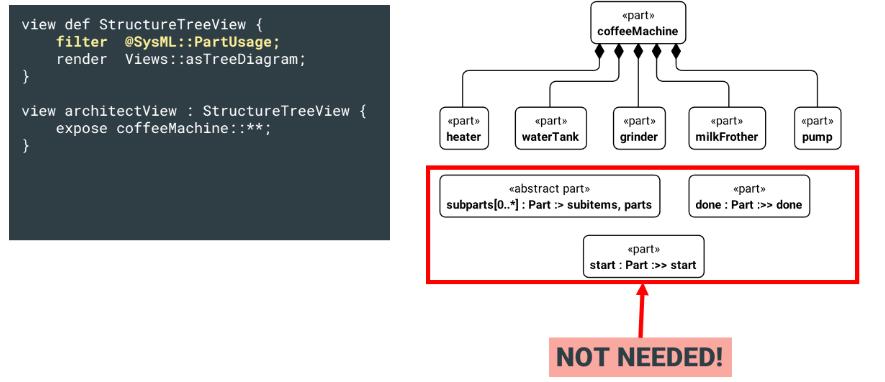 Figure 1: Automatic view generation with unwanted inherited elements
Approach 1: CATIA Magic with Library Filters
Cameo Systems Modeler (now CATIA Magic) ships with ready-made filter definitions. You specialise your view definition from EssentialElementsFilter and NonStandardLibraryElementFilter — and the library noise disappears without writing a single filter expression. This is the cleanest to read and the natural choice when the team lives in Cameo. The price is portability: DassaultSystemesViews is a vendor library, so this model will not render the same way in another tool.
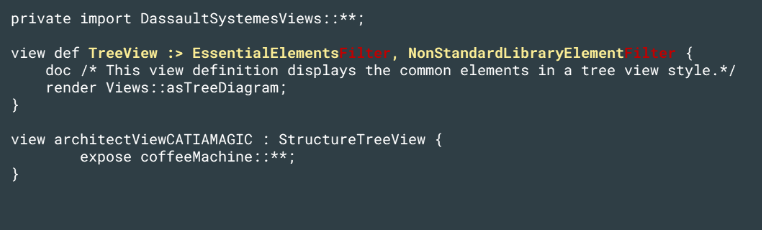 Figure 2: SysML v2 text notation for generating dynamic views in CATIA Magic
Approach 2: SysIDE with the depth Attribute
SysIDE adds the depth attribute, which lets you specify how many levels of descendants are shown in the view. Further details can be found in the SysIDE documentation.
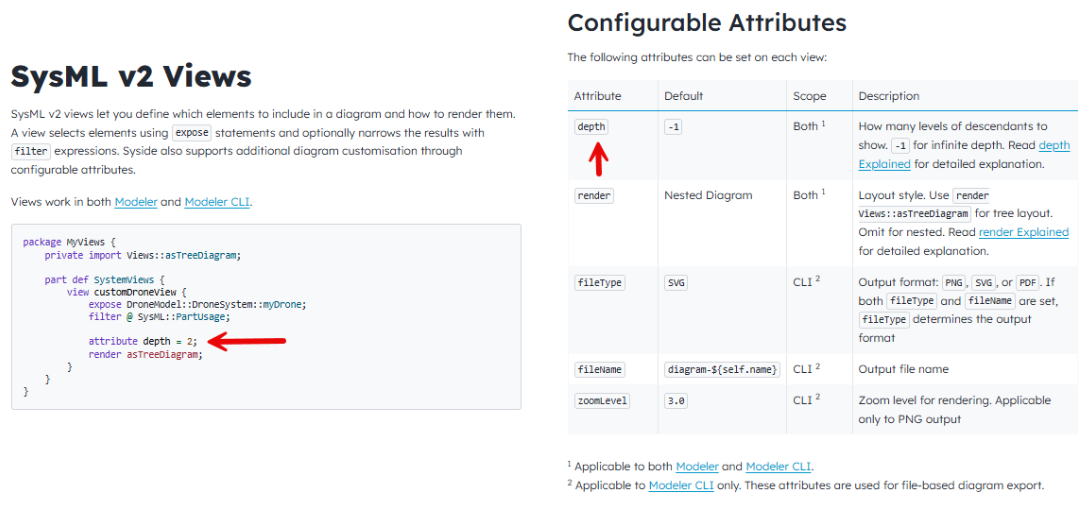 Figure 3: SysML v2 text notation for generating dynamic views in SysIDE
Source
Figure 3: SysML v2 text notation for generating dynamic views in SysIDE
Source
Approach 3: Portable with not isLibraryElement
If you want a model that behaves consistently across tools, write the filter explicitly using isLibraryElement. This flag is true on every element inherited from a standard library package — so not isLibraryElement retains only what the modeller created themselves. The form @SysML::PartUsage and not isLibraryElement is the portable variant, applicable across different tools. For an interconnection diagram instead of a tree, swap the metaclass and render: @SysML::ConnectionUsage with render Views::asInterconnectionDiagram.
Whatever filter you use: always combine the metaclass test with not isLibraryElement. That one forgotten clause is the most common reason for "my diagram has boxes I never modelled."
How generation is triggered
The filter is half the work. The rest is the generation itself: in Cameo/CATIA Magic, right-click the view and select Generate Views. In SysIDE in VS Code, the diagram updates live on save. With the Syside CLI it runs in a pipeline for batch regeneration — you pass the fully qualified view name with -n. File name and format come from the fileName and fileType attributes. Wired into CI, every commit delivers fresh, correct diagrams without any manual drawing.
Which Approach to Choose?
By default, the portable filter not isLibraryElement: it works in Cameo, is close to what SysIDE expects, and keeps the model vendor-neutral. The principle behind all three is the same one that makes MBSE worthwhile in the first place: the model is the single source of truth, and diagrams are generated from it — never the other way around.
Have a topic you'd like us to write about? Let us know.